
Turf Booking by Voice Note on WhatsApp, in Tamil
Turf booking by voice note: players say the sport, day, time and place on WhatsApp in Tamil or English, and get the free courts to confirm. How it works.
Turf booking by voice note means a player can send one WhatsApp voice message, like "pickleball tomorrow 7pm in Chennai", and get back the courts that are free at that time, with the price and a Confirm button. No typing, no menus to tap through, and it works in Tamil as well as English. This guide explains how it works on Turf Access, what the player sees, what stays under the owner's control, and when it helps.
Why voice notes, and why now
Most turf bookings in Tamil Nadu already start on WhatsApp, and many players would rather speak than type. WhatsApp users send about 7 billion voice messages every day (WhatsApp). For a booking, a voice note is often the quickest way to say four things at once: the sport, the day, the time and the place.
Language matters too. Indian-language internet users passed English users years ago, reaching 234 million by the end of 2016, and they find content in their own language more reliable than English content (KPMG and Google). The same report expected Tamil users to be among the most digitally engaged. A booking flow that understands "நாளைக்கு சாயங்காலம் 7 மணிக்கு" is simply easier for many of your players than a list of English buttons.
What changed recently is that AI models can now listen to a short voice note and pull out structured details reliably. Turf Access uses Google's Gemini models, which accept audio directly (Google AI for Developers), so there is no separate speech-to-text step.
How turf booking by voice note works
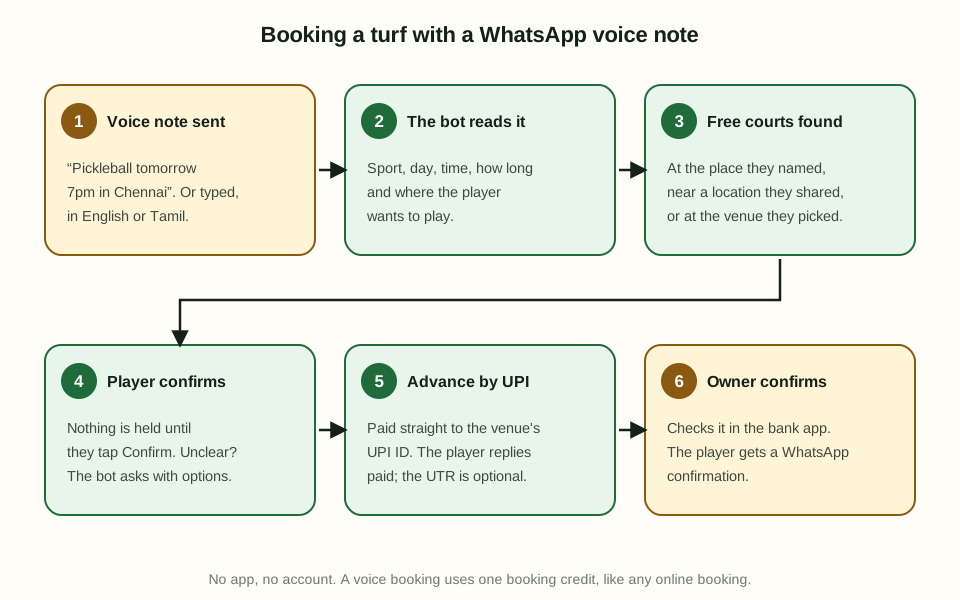
- The player sends a voice note to the Turf Access WhatsApp number, or types the same sentence. For example: "Need a box cricket turf this Saturday, 8pm, two hours, Velachery."
- The bot reads the request: sport, day, time, how long, and where. "Football" or "box cricket" without a size matches every 5-a-side, 7-a-side and 9-a-side court.
- Free courts are found. The bot looks at the place the player named, or near a location they shared in the last two hours, or at the venue they picked in the last half hour. If it knows none of these, it asks for the location first and keeps the request, so the player doesn't have to repeat it.
- The player taps Confirm. One exact match goes straight to the confirm card with the court, time and price. Several matches come as a list. If the exact time isn't free, the nearest free times are shown.
- The advance is paid by UPI, straight to the venue's own UPI ID. The player then replies "paid" or taps Payment done; the 12-digit UTR is optional.
- The owner checks the payment in their bank app and confirms. The player gets a WhatsApp confirmation and a reminder before the game.
Steps 4 to 6 are the same as any WhatsApp booking on Turf Access. Our guide on taking turf bookings on WhatsApp covers that part in detail.
What the player can say
Players don't need special words. These all work, in English, Tamil or a mix:
| The player says | What the bot does |
|---|---|
| "Pickleball tomorrow 7pm in Chennai" | Free pickleball courts in Chennai at 7 PM tomorrow |
| "நாளை சாயங்காலம் 6 மணிக்கு பேட்மிண்டன்" | Free badminton courts at 6 PM tomorrow, replies in Tamil |
| "Make it three hours" | Changes the length of the booking being discussed and shows an updated confirm card |
| "Not this one, show me another venue" | Leaves out the current venue and looks for others nearby |
| "Show my bookings" / "Cancel my booking" | Lists their bookings, or the bookings they can still cancel |
| "What slots are free in the evening?" | Lists the free evening times instead of picking one |
Follow-ups work because the bot remembers the request for 30 minutes. "Three hours", "make it 8", "Friday instead" or "one more hour" change only that part, and the confirm card says it was updated.
When the bot isn't sure, it asks
A wrong booking is worse than a question, so the bot asks with options instead of guessing:
- No day given: a list of the next eight days.
- No sport, and the venue has several: a list of its sports.
- No time, and many times are free: morning, afternoon, evening or night first, then the times in that part of the day.
- Not about bookings at all: the normal menu, and the chat is flagged so someone from the venue can reply.
Nothing is ever held until the player taps Confirm. Prices and free slots always come from the venue's own board, never from the AI, so the bot can't offer a slot that is taken or a price you didn't set.
Tamil or English, the player chooses
When a player writes or speaks in Tamil, the bot answers in Tamil for the rest of the chat: the menus, the slot lists, the payment steps and the confirmation. A "தமிழ் / English" button on the menu lets them switch at any time. Venue and court names, prices and booking references stay as you entered them, so nothing gets lost in translation.
Privacy and control for the owner
Voice notes raise fair questions, so here is exactly what happens:
- The audio is not stored. It is sent to Google Gemini to read the request, then discarded. Only the text of what the player said is kept with the chat, so your team can read it in the inbox.
- No personal data goes to the AI beyond the voice note itself. The model is given today's date, the list of sports and the booking request being discussed, not the player's name, number or past bookings.
- Limits stop misuse. Each player has a daily limit on AI requests, and long voice notes are politely refused.
- The usual booking rules apply: your hours, prices, advance amount, hold time and cancellation cut-off.
If the AI is ever unavailable, the WhatsApp bot falls back to the normal tap-through booking, so bookings never stop.
When voice booking helps most
- Evening rush. Players booking for tonight from the car or the office can just say it.
- Older players and parents booking for kids, who find menus slow on a small screen.
- Regular groups who always want "our usual court, Saturday 7pm".
- Multi-sport venues, where a player says "badminton" and doesn't have to scroll past football and pickleball.
It doesn't replace your booking link. Many players still prefer to see the whole day's board and pick a slot. Voice is one more way in, on the app they already use. Faster bookings still go through the same payment check, so read how to check UPI payments for fake screenshots to keep that step safe.
How Turf Access helps
Turf Access gives every venue a booking link and booking on a shared WhatsApp number, with no commission. Players can tap through the menus or just send a voice note in Tamil or English, and the bot shows your free courts and prices. The advance goes straight to your UPI ID, the slot is held while they pay, and you confirm the payment against your bank. Every online booking, typed or spoken, uses one prepaid booking credit; walk-ins and phone bookings you add yourself are free, and new venues get 20 free credits to start. See how the bot works on the WhatsApp turf booking page, and set up your venue in about five minutes.
Frequently asked questions
Can players book a turf by sending a voice note on WhatsApp?
Yes. On Turf Access a player sends a voice note to the booking number, such as pickleball tomorrow 7pm in Chennai. The bot reads the sport, day, time and place, shows the free courts, and the player taps Confirm. Nothing is held until they confirm.
Does voice booking work in Tamil?
Yes. Players can speak in Tamil, English or a mix of both. When a player writes or speaks in Tamil, the bot replies in Tamil for the rest of the chat, and a button on the menu switches between Tamil and English.
What happens if the bot does not understand the voice note?
It asks instead of guessing. If the day or sport is missing it shows a list to pick from, if many times are free it asks morning, afternoon, evening or night, and anything else gets the normal menu buttons.
Is the voice recording stored?
No. The voice note is sent to Google Gemini to read the request and is not kept by Turf Access. Only the text of what the player said is saved with the chat, so the venue team can read it.
Does a voice booking cost the owner more?
No. A booking made from a voice note is an online booking like any other and uses one booking credit. Walk-ins and phone bookings the owner adds stay free.