
Turf Booking on WhatsApp: Stop Double Bookings
Turf booking on WhatsApp without the chaos: templates, a shared sheet and advance rules that stop double bookings, and when to move to a booking bot.
Turf booking on WhatsApp works well if you treat WhatsApp as the front door and keep the actual booking record somewhere else: one shared sheet or calendar, with an advance on UPI before you confirm. Most double bookings and no-shows come from slots being promised in chat but never written down. When messages grow faster than you can answer, a WhatsApp booking bot can take over the routine part.
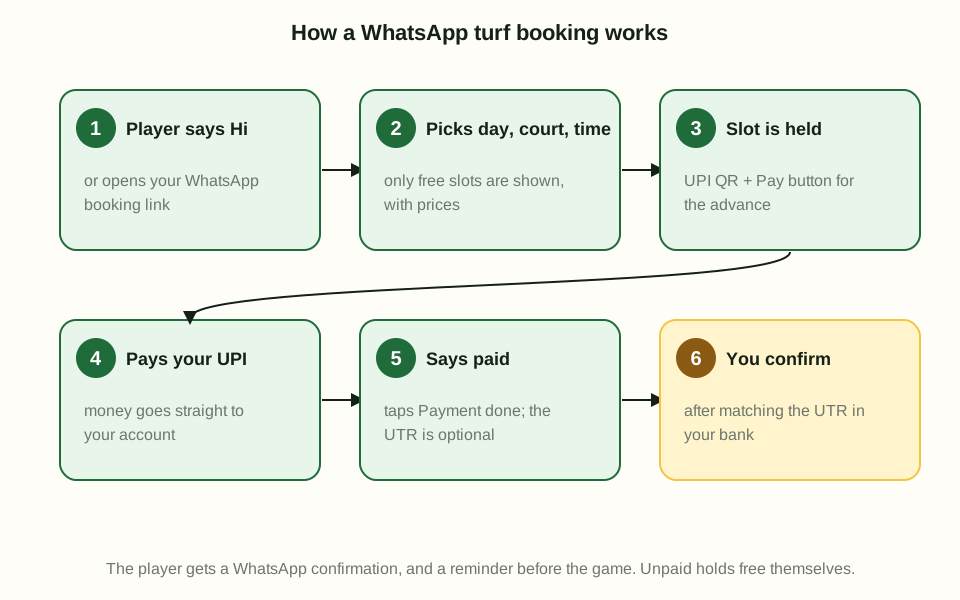
This guide covers why owners use WhatsApp, where it goes wrong, a manual system that works, and how a booking bot flow works.
Why turf owners take bookings on WhatsApp
Your players are already there. WhatsApp has over 500 million users in India (Rest of World). For a group of friends planning a Saturday match, messaging the turf is the most natural thing to do.
It also suits owners:
- No app to download for the player.
- Easy to share photos, location and prices.
- Groups can be added for regulars and tournaments.
- The free WhatsApp Business app adds quick replies, greeting and away messages, and labels to organise chats (WhatsApp Business).
For a single court with a handful of bookings a day, WhatsApp alone can be enough. The trouble starts as you grow.
The problems with turf booking on WhatsApp
Double bookings
You confirm 7 pm to one group on WhatsApp. Your staff confirms the same slot to a walk-in. Both groups turn up. This happens because the chat is not a calendar. Each conversation lives on its own, and nothing stops two people promising the same hour.
Missed messages at night
Players plan matches late at night. If you reply at 9 am, the group may have booked elsewhere. An away message helps, but it can't take the booking for you.
Chasing payments
"Will pay at the ground" often means the group doesn't come. Chasing advances one by one takes time, and checking screenshots against your bank is slow.
No-shows
Without an advance, a booking costs the player nothing to skip. The slot sits empty and you can't resell it at short notice.
Fake or reused payment proof
Screenshots can be edited, and the same proof can be sent twice. Our guide to fake UPI payment screenshots covers how to check them.
A manual WhatsApp booking system that works
You don't need software to fix most of this. You need a few rules, followed every time.
1. Save message templates
Use quick replies in the WhatsApp Business app for the messages you send again and again (WhatsApp Business). Useful ones:
- Prices: your slot prices for weekday, weekend and peak hours.
- Booking rules: advance amount, UPI ID, cancellation rule.
- Confirmation: date, court, start and end time, amount paid, balance due.
- Reminder: sent a few hours before the slot.
- Location: map pin, parking and entry details.
Templates keep answers consistent, whoever is replying.
2. Keep one shared sheet or calendar
This is the rule that stops double bookings. Every booking, from any channel, goes in one place before it is confirmed.
A simple sheet works:
| Date | Court | Start | End | Name | Phone | Advance | UTR | Source |
|---|---|---|---|---|---|---|---|---|
| Sat | Court 1 | 19:00 | 20:00 | Group name | Mobile | Amount | 12 digits |
- Share it with everyone who takes bookings.
- Mark the slot as "held" the moment you start talking to a player, and "confirmed" after payment.
- Phone, walk-in and app bookings go in the same sheet.
3. Set clear advance rules
- Ask for a fixed advance on UPI for every online booking.
- Hold the slot for a short, fixed time while the player pays. If they don't pay, release it.
- Ask for the 12-digit UPI reference number (UTR) with the payment (PhonePe Business).
- Match the UTR with the credit in your bank before you confirm.
- Write your cancellation and refund rule in the booking message.
4. Label every chat
Use labels such as "New enquiry", "Payment pending" and "Confirmed" so nothing gets lost in a busy evening.
5. Send reminders
A short reminder a few hours before the slot cuts no-shows and gives players a chance to cancel in time for you to resell.
6. Handle cancellations in the same place
When a player cancels, update the sheet first, then reply. Note whether the advance is refunded, kept or moved to another date, so the next person who checks the sheet sees the full story. Release the slot straight away and, if it's a busy evening, post it in your regulars' group. A cancelled slot that nobody hears about is lost money.
7. Review the week
Once a week, look at the sheet. Which slots stayed empty? Which groups didn't turn up? Which time bands filled first? This tells you where to change prices, where to run an offer and which players to call.
When to move to a WhatsApp booking bot
The manual system works, but it depends on people. Consider a bot when:
- You have more than one court and more than one person taking bookings.
- You miss booking messages at night or during busy hours.
- You spend hours a day replying with prices and open slots.
- You still get double bookings, even with a sheet.
- Checking payments against the bank takes too long.
A bot doesn't replace your WhatsApp chats with regulars. It handles the repeat steps (showing open slots, collecting details, holding the slot and asking for payment) so you only step in to check and confirm.
How a turf booking WhatsApp bot works
Here is how the flow works in Turf Access, step by step.
- The player messages the shared Turf Access WhatsApp number to book at your venue.
- They pick a day, court, start time and length. Only open slots are shown, because the bot reads the same board as your walk-in and phone bookings.
- They confirm the booking details.
- The slot is held for a few minutes while they pay.
- They pay the advance straight to your own UPI ID, using the QR or their UPI app. Turf Access never holds the money.
- They say they paid: one tap on Payment done, or "paid" in the chat. The 12-digit UTR is optional extra proof.
- You get an alert for the payment to check. If that UTR was already used on another booking, it is flagged.
- You check your bank and confirm. The player gets a WhatsApp confirmation, and later a reminder.
Businesses that send messages at scale use the WhatsApp Business Platform, where pre-approved templates are used to message people outside an active chat window (Meta for Developers). That is how reminders and confirmations can reach players without you typing each one.
If you also list on marketplaces, keep your direct bookings in the same system. Our guide on marketplace commission vs your own booking link compares the costs.
How Turf Access helps
Turf Access gives every venue booking through a shared WhatsApp number and a booking link (turfaccess.com/book/<venue>). Players pick a day, court, time and length, pay the advance to your own UPI ID, and tap Payment done (sharing the UTR is optional). A UTR already used on another booking is flagged, and you confirm after checking your bank.
Walk-ins and phone bookings you add are free and sit on the same day's board, so the bot never sells a taken slot. There is no commission. You pay one prepaid credit per online booking, from ₹599 for 50, and new venues get 20 free credits. See WhatsApp turf booking for how it works.
Frequently asked questions
How do I take turf bookings on WhatsApp?
Use the free WhatsApp Business app, save quick replies for your price list and booking rules, and record every booking in one shared sheet or calendar before you confirm. Ask for an advance on UPI and only confirm once you see the money in your bank.
How do I stop double bookings on my turf?
Keep one place where every booking is written, whether it came on WhatsApp, a phone call, a walk-in or an app. Only one person confirms slots at a time, and a slot is never confirmed until it is marked taken in that one place.
What is a WhatsApp booking bot for a turf?
It is an automated chat on WhatsApp that shows players open slots, lets them pick a day, court, time and length, and holds the slot while they pay. It reads from the same calendar as your other bookings, so it cannot sell a slot that is already taken.
Should I take an advance for turf bookings on WhatsApp?
Yes, most owners do, because it cuts no-shows. Ask for a fixed advance on UPI, confirm only after checking the payment in your bank, and write your cancellation rule into your booking message so players know it up front.
How do I check if a UPI payment for a booking is real?
Ask for the 12-digit UPI reference number (UTR) and match it with the credit in your bank app or statement. A screenshot alone can be edited, so always check the bank side before you confirm.